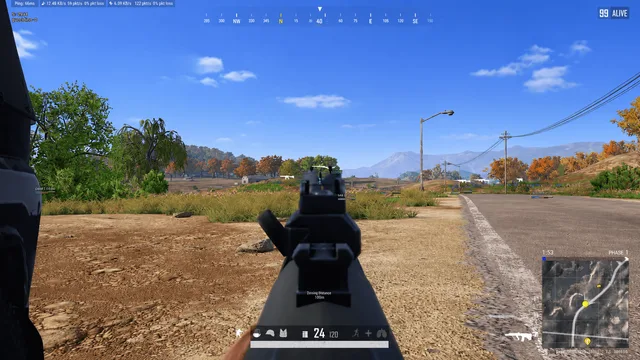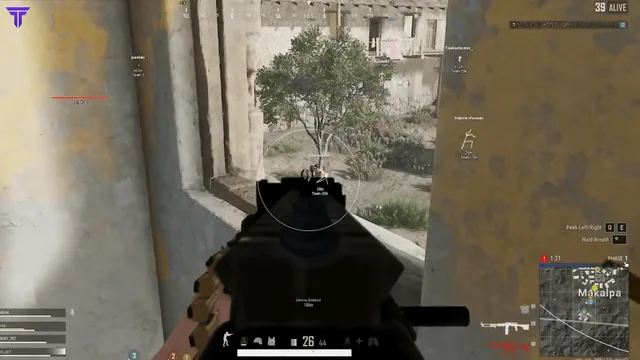
PUBG on PC

PUBG Cheats

Four product pages for Steam PUBG on Windows: Elite for player markers, loot and vehicles, and recoil profiles; three utilities for skins, hardware IDs, and appeal notes. Check the homepage status note and each page’s limits before checkout.

Windows

Platform

PUBG PC

Game

Steam

Launcher

Partner store

Checkout

Player ESP
Loot markers
Windows build
Status note
Recoil profiles
Weapon class
Recording check
Vehicle markers
Distance labels
Circle context
Saved presets
Order guide
Read the risks
Separate utilities
Skin preview
Build status
Patch notes
Windows 10 & 11
PUBG on PC
Steam launcher
Status note
Saved presets
Email support
Separate utilities
Partner checkout

Features

What the PUBG build is organized around

Information overlays, weapon profiles, and utilities. Each one is described on its product page.

Player ESP

See distance before the peek.

Boxes, health, and team colors with a range cap so an 8 km map does not cover the screen.

  • Player boxes with distance
  • Health and team color split
  • Range limit for compounds versus open fields
  • A quieter preset for the final circles
  • Status check before you launch after a patch
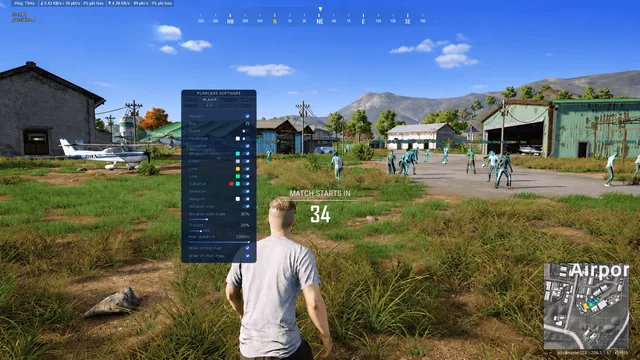
Loot and vehicles

Filter the ground.

Highlight the weapons, armor, and vehicles you actually rotate with. Leave the rest off.

  • Category loot filter
  • Vehicle markers
  • Airdrop markers

Circle context

Know the rotate.

Distance and zone context so a late rotate is a decision, not a guess from the minimap alone.

  • Circle distance readout
  • Late-game preset
  • Less clutter than a full loot dump

Recoil profiles

One gun is not every gun.

Profiles follow weapon class. An AR, a DMR, and an SMG do not share one setting.

  • Profiles by weapon class
  • Mild and strong slots
  • Match the attachments you have on

Utility suite

Sold as their own pages.

Skin preview, hardware-identifier tools, and appeal notes are not hidden inside Elite.

  • Skin Changer: local preview only
  • HWID Spoofer: separate utility and separate risks
  • UGC: appeal notes, not a guaranteed restore
  • Recording check before you publish a clip

Loot priority

Show less on purpose.

A hot drop needs armor and a gun. A late circle needs heals and a scope. Presets keep those apart.

  • Hot-drop preset
  • Late-game preset
  • Category toggles instead of every item
  • Readable colors on bright maps

Recording check

Watch the file, not the preview.

Capture software does not always match what you see. Record a minute and play it back before you stream.

  • Lobby and in-match samples
  • Same scene you plan to use
  • Stop if the file shows something you did not want

Distance labels

A number next to the box.

Distance labels tell you whether a fight is a DMR problem or a close AR problem.

  • Meters on the player box
  • Shorter range in buildings
  • Longer range only if you can still read it

Saved presets

Do not reuse a stale file.

Presets ship with the order. After a PUBG update, read the status note before you load last week’s file.

  • Two preset slots
  • Change one option at a time
  • Homepage status note after patches

Products

What we sell on cheats-pubg.com

One Elite gameplay build and three utilities—each with its own product page and checkout button.

Why this catalog

One gameplay build and three utilities, named separately

Cheats PUBG lists Elite, Skin Changer, HWID Spoofer, and UGC as different jobs. The page you open should match the thing you are trying to do.

  • Status before launch

    The homepage note is the current build state. A product page can stay online while a build is offline.

    Cheats PUBG
    A mixed listing
  • Presets instead of one max setting

    Hot-drop and late-game layouts are separate so the screen stays readable.

    Cheats PUBG
    A mixed listing
  • Email that matches the order

    Support asks for the checkout email, Windows version, and the exact message. That is the whole ticket.

    Cheats PUBG
    A mixed listing
  • Utilities are not bundled by surprise

    Cosmetic preview, hardware tools, and appeal notes have their own pages and their own limitations.

    Cheats PUBG
    A mixed listing
  • Guides that say what they will not do

    Articles explain the catalog. They do not publish loader steps or a spoofing procedure.

    Cheats PUBG
    A mixed listing
  • Partner checkout

    Payment happens on the store linked from the buy button. Card numbers are not stored here.

    Cheats PUBG
    A mixed listing

4

Named products

Elite, Skin Changer, HWID Spoofer, and UGC. Each page says what it does not include.

PC

Windows only

Windows 10 or 11, 64-bit, with a PUBG client that already launches.

Email

Support path

Write from the address you used at checkout. Include the product name.

Setup guide

From the product page to a first session in three checks

Read the status note, pay through the button on the product page, and follow only the guide that arrives with that order.

  1. Confirm the build status

  2. Choose the matching product

  3. Launch PUBG after the guide

How it works

From the status note to a saved preset.

A short path that starts with whether the current build is even online.

4 checks

  1. 01

    Read the status note

    If it says offline or updating, stop. The product page is not a promise that today’s build is ready.

  2. 02

    Open the matching page

    Elite, Skin Changer, HWID Spoofer, or UGC. The buy button is on that page.

  3. 03

    Use the order guide

    Follow the notes that arrive with the order. Ignore files sent by someone who is not that order.

  4. 04

    Keep one preset

    Change a single option, play a short session, and keep the layout you can still read.

Blog

Guides and update notes

How the catalog is split, what each product refuses to promise, and what to check after a PUBG patch.

How Cheats PUBG groups player ESP, loot markers, recoil profiles, Elite access, and the separate utility products.

A plain-language look at player boxes, distance, and health markers, and why you should read the status note before a session.

What is included on the Elite product page, how it differs from the utilities, and what to confirm before checkout.

FAQ

Questions about this page

Answers tied to what you are reading. The FAQ page has every topic.